
Bookkeeping, invoicing and reports inside your assistant
Your AI already understands your business. Give it a ledger.
Drop receipts, statements and bills into ChatGPT or Claude. Your assistant reads them. Books For AI keeps real double-entry books and makes the invoices your assistant sends. Your reports show up in the chat.
Free forever for up to 50 entries a month, with no limit on quotes and invoices. Set up in one conversation.
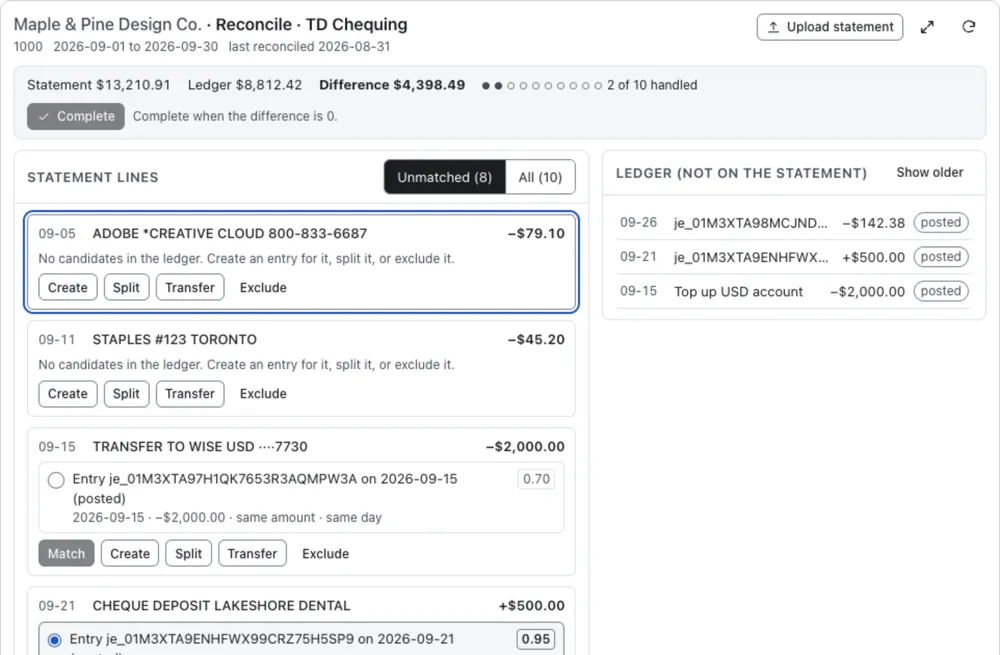
You: Here's my TD chequing statement for September.td-sept.csv
AssistantImported 42 lines and matched 37 to your entries. Five need a decision: pick the match or create the entry on the reconciliation screen.
How it works
Up and running in one conversation.
-
Add Books For AI to your assistant.
In ChatGPT or Claude, with one address. Other MCP assistants work too (MCP is the open standard assistants use to connect to tools). Sign in with your e-mail.
-
Set up your business in the chat.
Country, currency, fiscal year, a starter chart of accounts, your bank and card accounts. Your private database is created right away.
-
Drop things in.
Receipts, statements, bills. Say “invoice Riverside Café for the menu redesign”. Ask “how did September go?”
Free forever for up to 50 entries a month, with no limit on quotes and invoices.
Say it, and it's done
Five things people say on their first day.
| You say | What happens |
|---|---|
| “Here's lunch with a client.” (photo) | A draft expense: Meals and entertainment, with its sales tax and the receipt attached. You confirm; it is posted. |
| “Reconcile my September chequing statement.” (PDF or CSV) | The lines are imported, the likely matches proposed, and the rest booked as new entries. The Reconciliation screen shows the difference until it is $0.00. |
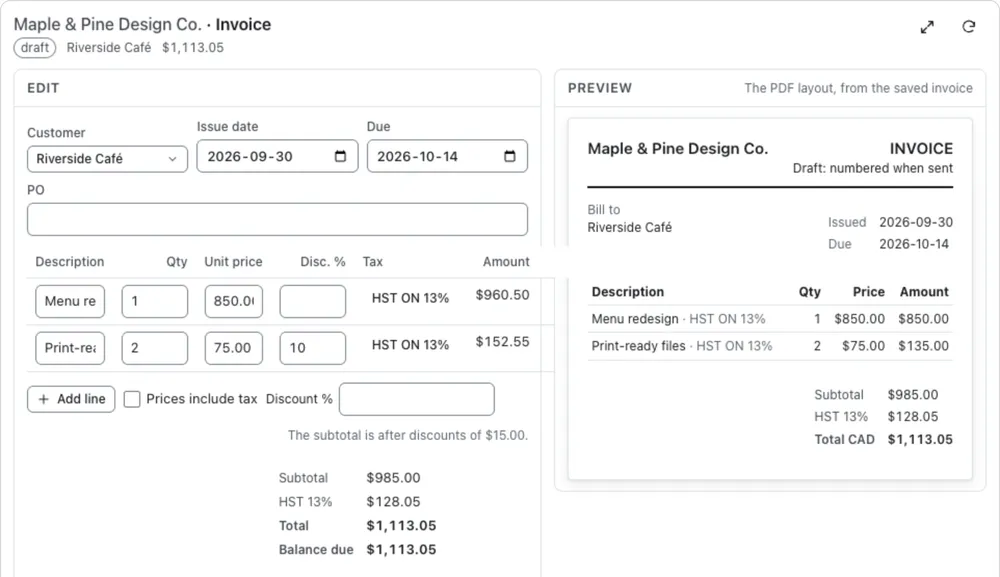
| “Invoice Riverside Café $850 for the menu redesign, due in 14 days.” | A draft invoice with HST, shown in the Invoice Builder. Say “send it”. Your assistant sends the PDF and the link to its invoice page from your own e-mail. |
| “Who owes me money?” | The Open Items screen: what each customer owes, what is overdue and by how long. Your assistant prepares the reminders and sends them from your own e-mail. |
| “How did September compare to August?” | Profit and loss for both months side by side, with the change by account. |
Your assistant proposes; you confirm. Books For AI makes sure every entry balances, stays put, and comes back out as proper reports.
Features
Real books, without the bookkeeping software.
Double-entry ledger
Balanced entries, a chart of accounts for your kind of business, and locked periods. Every entry records who posted it: you, your assistant, a rule or a member of your team. Starter charts of accounts for 22 countries, with the local tax codes.
Documents and reconciliation
Receipts, bills and statements linked to their entries. Match candidates scored for your assistant; you confirm.
Invoices your customers can pay
A PDF and a page your customer can open, sent by your assistant from your own address. They can pay from it by card, bank transfer or PayPal.
Reports and charts in the chat
Balance sheet, profit and loss, cash flow, trial balance, aging, tax summary and trends, with comparisons and drill-down.
Taxes and currencies
Sales tax, VAT and GST/HST, including compound and tax-inclusive rates. On paid plans, invoices and bills in any currency.
Your accountant's own seat
Invite them with one sentence. They review and correct the books from their own assistant and lock the month when it is done.
See it in your chat
Your books, shown where you work.
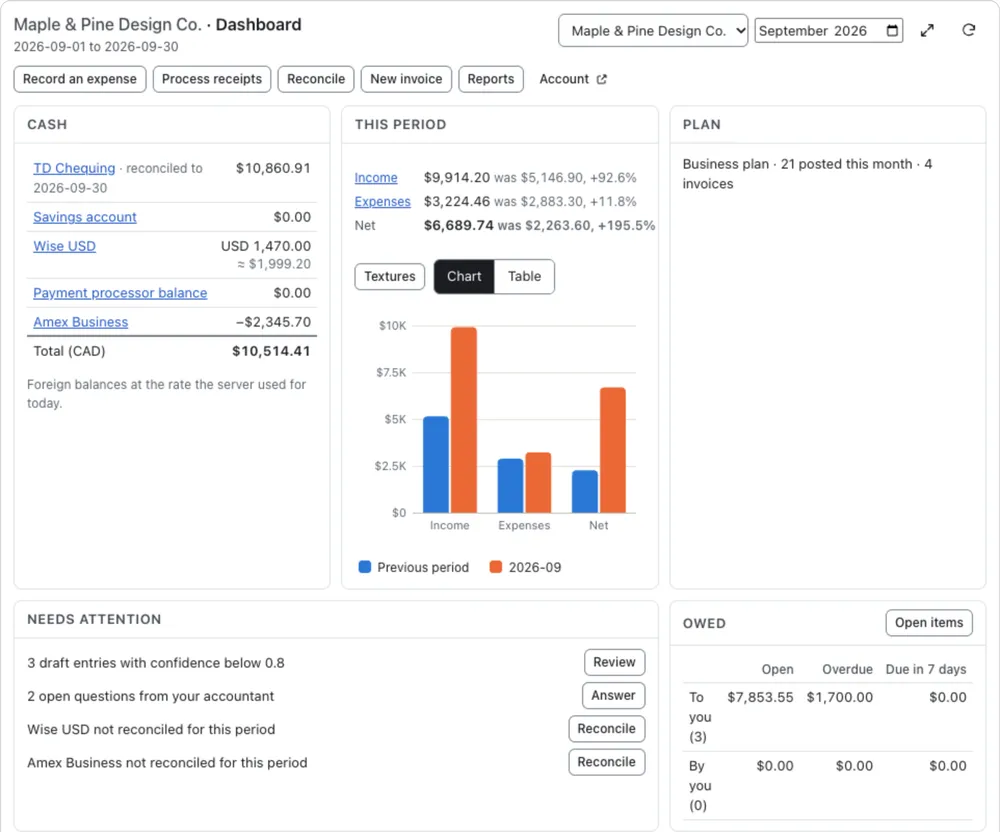
Real screens, from a demo business. AI assistants that support the MCP Apps protocol (including ChatGPT and Claude) show visual, interactive screens like these inside the conversation.
You: How are we doing this month?
AssistantHere's September: cash by account, income and expenses against August, and what needs your attention.
You: Invoice Riverside Café for the menu redesign and two print-ready files with 10% off the files.
AssistantHere's the draft with HST: $1,113.05. Say “send it” when it looks right.
All the screens, including Reconciliation and Profit and loss →
Free forever for up to 50 entries a month, with no limit on quotes and invoices.
AI-first
Built for where you work
Want an AI accountant? The assistant you already use can be one, with the right tools behind it. Books For AI is those tools: a service your assistant connects to, not another tab to keep open. Ask in plain language; the work is done and the record is kept. It is one of three products from WAB Apps built the same way. WAB Apps keeps its own books in Books For AI.
Plans
Pay for the ledger, not for the AI.
Your assistant does the thinking on the subscription you already have. Every plan has every report, every screen and export at any time.
Free
$0 for as long as you like; not a trial
1 business · You
- 50 posted entries a month
- Unlimited invoices
- 500 MB of documents
- Pay online from the invoice page (1% platform fee per online payment)
- Every report, every screen, export any time
Solo
$12 a month or $120 a year
1 business · You and your accountant (or one viewer)
- Posted entries: no monthly limit
- Quotes and invoices: no monthly limit
- 10 GB of documents
- Pay online from the invoice page
- Foreign currencies
- Every report, every screen, export any time
Business
$29 a month or $290 a year
Up to 3 businesses · 5, with roles
- Posted entries: no monthly limit per business
- Quotes and invoices: no monthly limit
- 50 GB of documents
- Pay online from the invoice page
- Foreign currencies
- Every report, every screen, export any time
- Prices in US dollars, monthly or yearly. Taxes are added at checkout where they apply. Export your data any time, on any plan, including a lapsed one.
- If your plan lapses, your books stay; you just can't post beyond the Free limits. Bookkeeper or accountant with many clients? E-mail us.
Trust and security
Your books, in their own database.
- One database per business. Not a row in a shared table. Yours is created when you set up and deleted when you say so.
- No full card or account numbers. Card and account numbers in statements and receipts are cut to their last four digits before anything is stored. Card payments on your invoices run on Stripe's pages; we never see a card.
- Locked periods and a record of every change. Once you lock a month, nothing in it changes. Every entry records who posted it: you, your assistant, a rule or a member of your team.
- Encrypted, recoverable, yours to export. Encrypted in transit and at rest on Cloudflare. Each database can be restored to any point in the last 30 days. Export in the layouts your accountant uses, on any plan. We never use your records to train AI models.
FAQ
Questions people ask first.
Does Books For AI include any AI?
No. Books For AI is the system of record your AI works from to manage your books. It stores your business data securely in your own account, and it is not tied to any AI provider. The same account works from ChatGPT, Claude and any MCP assistant, and it stays yours if you switch.
Does it connect to my bank?
No, by design. You drop in a statement (CSV or PDF) or forward it, and your assistant imports and matches the lines. There are no bank credentials to hand over and nothing to break. (We're considering adding bank feeds. If you'd like them, tell your assistant; it records feature requests, and we read every one.)
What happens when I reach 50 posted entries on Free?
You can keep recording drafts, reading reports, exporting and using every screen. New postings wait until the first of next month, or until you choose a paid plan. Nothing is lost and nothing is deleted. Your assistant tells you as you get close to the limit. Invoices, and the payments recorded against them, don't count toward it. Free has no monthly limit on quotes and invoices.
Can my bookkeeper sign in?
Yes. Solo includes one more seat, for your accountant or a viewer. Business includes five seats with roles: owner, admin, bookkeeper, accountant and viewer. They add Books For AI to their own assistant and see the businesses they've been invited to.
Can I move from QuickBooks, Xero or a spreadsheet?
Yes. You start your books at a date you choose. Setup takes your chart of accounts from a starter template for your country and business type. You enter opening balances from your old system's trial balance or your first statement. Your history stays in the old system for reference.
Does it handle sales tax, VAT and GST?
Yes. Tax codes can have one or more parts (for example GST plus PST, or HST). Prices can include tax or not. It handles recoverable tax on purchases and reverse charge, and gives you a tax summary by reporting box. Starter tax codes come for the United States, Canada, the United Kingdom, the EU, Australia and New Zealand. Filing is yours or your accountant's. Books For AI gives you the totals from your records.
Multiple currencies?
Yes, on Solo and Business. Invoices, bills, payments and accounts can be in any currency. Each is booked to your base currency at the European Central Bank's reference rate for the day, or a rate you set. When an invoice or bill is settled, the exchange gain or loss is posted for you.
How do my customers pay?
Each invoice you send has its own page with a PDF download. The page also shows the payment methods you switch on. Those are card through your own Stripe account, bank-transfer details, or a PayPal link. Card payments through Stripe are recorded automatically. The others you confirm in one sentence. The money goes to you; Books For AI never holds it.
Is there a fee when my customers pay online?
On Free, yes: a 1% platform fee on each card payment your customer makes through the invoice page. Stripe takes it from that payment, on top of its own processing fee, and it's booked in your books as its own expense. Your customer pays nothing extra. Bank transfers, PayPal and payments you record yourself carry no fee. Solo and Business pay no platform fee, so upgrading removes it.
Is my data secure?
Each business has its own database. Your assistant reaches it through a signed-in connection. You can make that connection read-only or no-sending, and disconnect it from your account page. Full card and account numbers are never stored: they are cut to their last four digits on the way in. Data is encrypted in transit and at rest. Each database can be restored to any point in the last 30 days. The security page has the details and the sub-processor list.
What if I cancel?
Your books stay. The business returns to the Free limits, and every report and export keeps working. Choose a plan again and you can post beyond those limits. If you want to leave entirely, export everything and delete the account from your account page. We e-mail you a link to the complete archive.
Which assistant works best?
Any MCP assistant that can connect to a remote server with sign-in can use it. Reading documents depends on your assistant's own vision and file handling, so stronger models read messy receipts better. AI assistants that support the MCP Apps protocol (including ChatGPT and Claude) show visual, interactive screens. Other assistants get the same results as text. Works best with more capable models.
Is there an app?
No. You see and manage your books in the chat. There is no mobile or web app. The website handles your plan, billing, people and exports only; it never shows your books. Your customers see one web page: the invoice they are paying. In assistants that support MCP Apps, Books For AI shows its screens inside the chat. Use them when you want to work by hand. An app is one more interface to learn. With the chat as the main interface, you hand the finding and the managing to your assistant instead. It also lets us offer what traditional software does at a fraction of the cost.
How do I give my accountant access?
Tell your assistant "invite my accountant" with their e-mail address, or invite them from your account page. They get an e-mail from Books For AI, sign in with that address, and add Books For AI to their own assistant. It costs them nothing. The seat is included on Solo and Business; on Free, send them the accountant export instead.
What can my accountant change, and will I know?
They can review and correct entries, reconcile, post adjusting entries and lock a period. They cannot send anything to your customers, change your business settings, or unlock a period you have locked. Everything they do is recorded under their name, and you can ask your assistant what they changed.
Give your assistant a ledger.
Add it in one conversation. Your assistant does the rest.
Free forever for up to 50 entries a month, with no limit on quotes and invoices.