
For accountants and bookkeepers
Your client's books, clean, in a ledger you can check.
Your client keeps their books by talking to their AI assistant. You get a real double-entry ledger with the source documents attached, a trial balance that ties, and your own sign-in, from your own assistant.
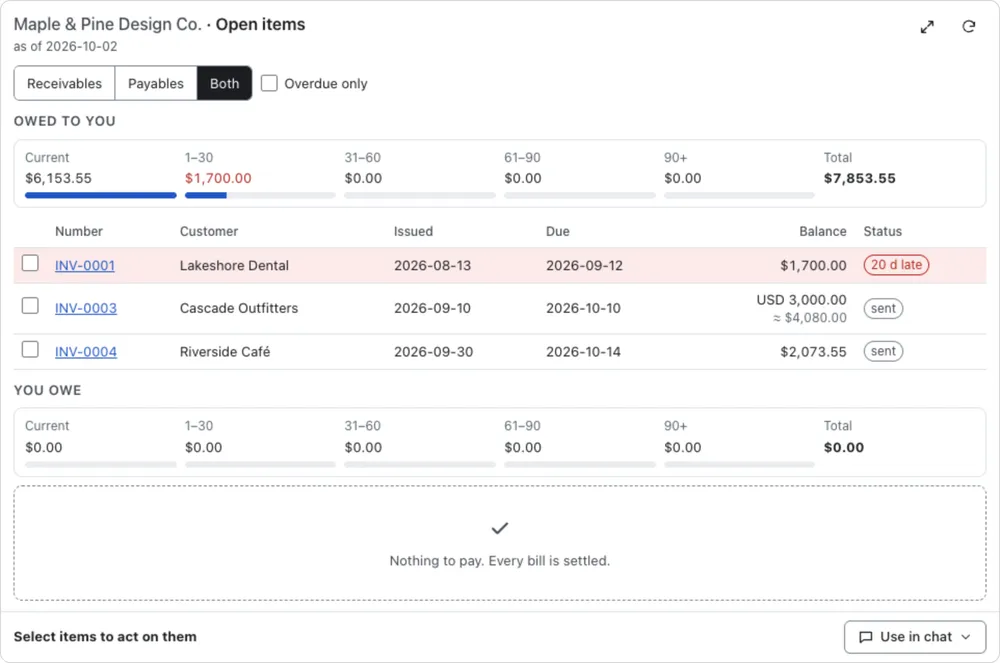
You: Show me what's still open for Maple & Pine.
AssistantLakeshore Dental's invoice is 20 days late; the others are not yet due. Nothing is owed to suppliers.
What you get
Records you can stand behind.
Real double entry
Every entry balances before it is stored, in its own currencies and in your client's base currency. Posted entries in a locked period cannot change. Corrections are reversals that leave the original in place.
A trial balance that ties
Every report states its tie to the ledger, and a nightly check confirms each business's trial balance still balances.
Source documents on every entry
Receipts, bills and statements are linked to the entries they support, with what was read from them and anything that did not add up.
Who posted what
Each entry records whether the client, their assistant, a rule or a team member posted it, and its change history.
Your tools
Review, ask, correct, close.
| Tool | What it does |
|---|---|
| Review status | Mark entries as reviewed (or clear the mark), and see what is left for the period. |
| Client queries | Put a question on the exact entry. The client's assistant brings it to them; their answer comes back to the same entry. |
| Bulk reclassification | Move many entries to the right account or tax code at once, with the tax recomputed. |
| Adjusting entries | Journal entries marked as adjustments, shown in their own column of the adjusted trial balance. |
| Reports | Adjusted trial balance, reconciliation report, tax detail, journal, general ledger, suspense items, and the standard statements. |
| Period locks | Lock the month when it is done so the numbers stay put. Only the business owner can unlock it. |
You close the year with adjusting entries and a lock.
How you join
Your client invites you. No cost to you.
Your client invites you.
They tell their assistant “invite my accountant” with your e-mail address, or invite you from their account page. You get an e-mail from Books For AI.
You sign in.
With that e-mail address. There is nothing to buy: the seat is part of your client's plan. Solo includes one; Business has five with roles.
One sign-in for every client.
Add Books For AI to your own assistant once. Every business that has invited you is there; you name the one you are working on.
What the accountant role cannot do: send anything to your client's customers, change the business's settings, or unlock a period the owner locked. Everything you do carries your name.
What is not here
Stated plainly.
- No payroll.
- No inventory valuation.
- No bank feeds: statements arrive as files.
- No filing of returns, and no tax or accounting advice. The tax summary groups the client's own records by tax code and reporting box; you decide what is filed.
Take it with you
Exports in layouts you already use.
General ledger, trial balance and journal as CSV or JSON, plus journal layouts for QuickBooks Online and Xero, on every plan and at any time. The accountant pack bundles them in one request.
Software that keeps the records. Your judgement stays yours.
Books For AI keeps your client's books balanced and documented. It does not review them, advise on them or file anything. That is your work, and the product is built to make it easier, not to do it.
Many clients?
Bookkeeper or accountant with many clients? E-mail us and tell us how you work.